

Multichannel outbound strategy: how to combine email, LinkedIn and calls
Most outbound teams already use more than one channel. They send emails, fire off LinkedIn invites and call when they have time. That isn’t a multichannel outbound strategy. It’s three single-channel campaigns running into the same person at once.
This guide shows how to turn those channels into one system: what each channel is for, how your data decides where you start, how many touches to send, and three sequences you can copy today.
KEY TAKEAWAYS
- A multichannel outbound strategy gives email, LinkedIn and phone each a job, and moves a prospect between them based on signals (opens, accepted invites, replies), not a fixed calendar.
- Start from your data. Whether you have a verified email, a mobile number or only a LinkedIn profile decides the first channel.
- Plan 6–9 touches over 14–21 days across channels, never more than two in a row on the same channel, and each touch must add a new angle.
- Follow-ups matter: in two large datasets they bring in 42–59% of all cold email replies.
- A reply on any channel stops every other channel.
CONTENTS
- What is a multichannel outbound strategy?
- Does multichannel outreach work better than email alone?
- What job does each outbound channel do?
- Start with your data: which channels can you actually use?
- How a branching multichannel sequence works
- How many touches, and how far apart?
- 3 multichannel sequences you can copy
- Common multichannel outreach mistakes
- Which metrics show your multichannel strategy is working?
Most outbound teams already use more than one channel. They send emails, fire off LinkedIn invites and call when they have time. That isn’t a multichannel outbound strategy. It’s three single-channel campaigns running into the same person at once.
This guide shows how to turn those channels into one system: what each channel is for, how your data decides where you start, how many touches to send, and three sequences you can copy today.
What is a multichannel outbound strategy?
A multichannel outbound strategy is a planned system for reaching new prospects across several channels, typically email, LinkedIn and phone, where each channel has a defined role and a prospect moves between them based on what they do. The goal is one conversation. The buyer should feel like they’re talking to one person.
The difference from “doing more channels” is coordination. In a real system:
- one message thread runs through all channels, so a LinkedIn note references the email instead of repeating it,
- behaviour triggers the next step (an accepted invite unlocks a LinkedIn message, an opened email unlocks a call),
- a reply on any channel stops every other channel.
Why bother? Buyers do more of the work alone. In a Gartner survey of 646 B2B buyers (2026), 67% said they prefer a rep-free buying experience, up from 61% a year earlier.
So you have very few places left to earn attention. Their inbox. Their LinkedIn feed. Sometimes their phone.
Does multichannel outreach work better than email alone?
Yes, in the data available, but the uplift depends on your audience, and the headline numbers you see online are rarely sourced. What independent datasets do show is that LinkedIn and phone reach people email misses, and that calls produce a large share of meetings even though they’re a small share of touches.
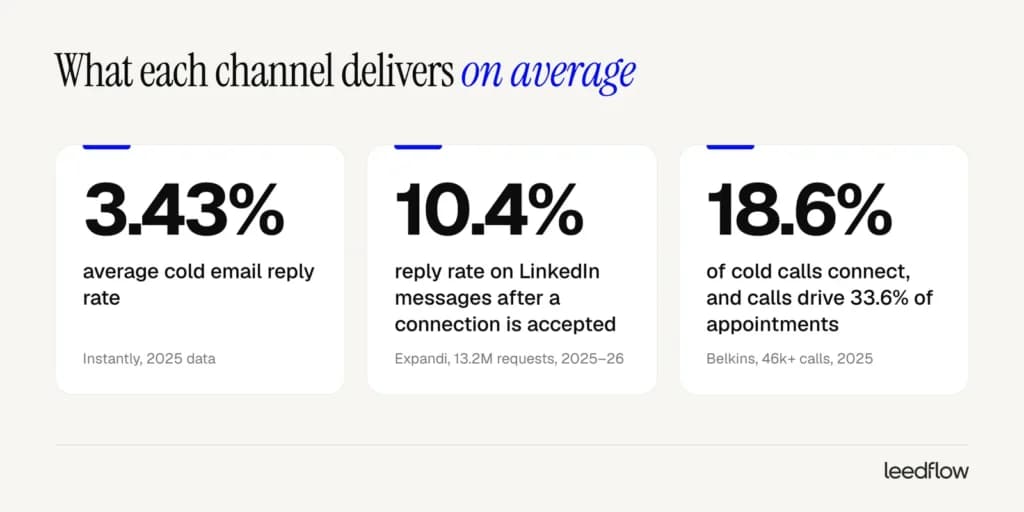
- Email: the average cold email reply rate is 3.43%, and the top quartile gets 5.5% or more (Instantly, 2026 report on 2025 data).
- LinkedIn: messages sent after a connection is accepted get a 10.4% reply rate, across 13.2 million connection requests (Expandi, 2026).
- Phone: 18.6% of cold calls connect, and calls produced 33.6% of all appointments in Belkins’ managed campaigns, while email produced about half (Belkins, 2026).
One caveat. These are vendors analysing their own customers’ campaigns, not controlled experiments, and the metrics aren’t identical (a call “connect” is not a reply).
The takeaway is simpler than the numbers. Each channel reaches people the others miss. Use one and you leave meetings on the table.
What job does each outbound channel do?
Each channel should have one main job. Email carries the argument, LinkedIn builds familiarity and context, and the phone converts prospects who have already shown interest. When a channel does a job it’s bad at, such as pitching in a LinkedIn invite or cold-calling without context, it drags the whole sequence down.
| Channel | Main job | Best for | Watch out for |
|---|---|---|---|
| Carry the argument: observation, proof, ask | Scale, detail, links and case studies | Deliverability. Needs a verified list and a healthy domain | |
| Familiarity and context: “I’ve seen this person before” | Warming up before and after emails, reaching people without a known email | Weekly invite limits, and pitching in the invite | |
| Phone | Convert warm signals into meetings | High-value accounts, prospects who opened or clicked | Calling cold without context. Needs a valid mobile number |
| WhatsApp / SMS | Quick coordination | Existing relationships only | Feels intrusive when cold |
A simple rule for escalation: move to a more personal channel only when the prospect gives you a reason. An accepted connection is a reason to message on LinkedIn. Two opens and a click on a pricing link is a reason to call.
Silence is not a reason to shout louder on a new channel.
Start with your data: which channels can you actually use?
Before you design a single step, check what you actually know about each prospect. A multichannel sequence only works on the channels your data supports, so a prospect with no verified email should never get an email step, and a call step is useless without a valid mobile number. Your data profile decides the first channel.
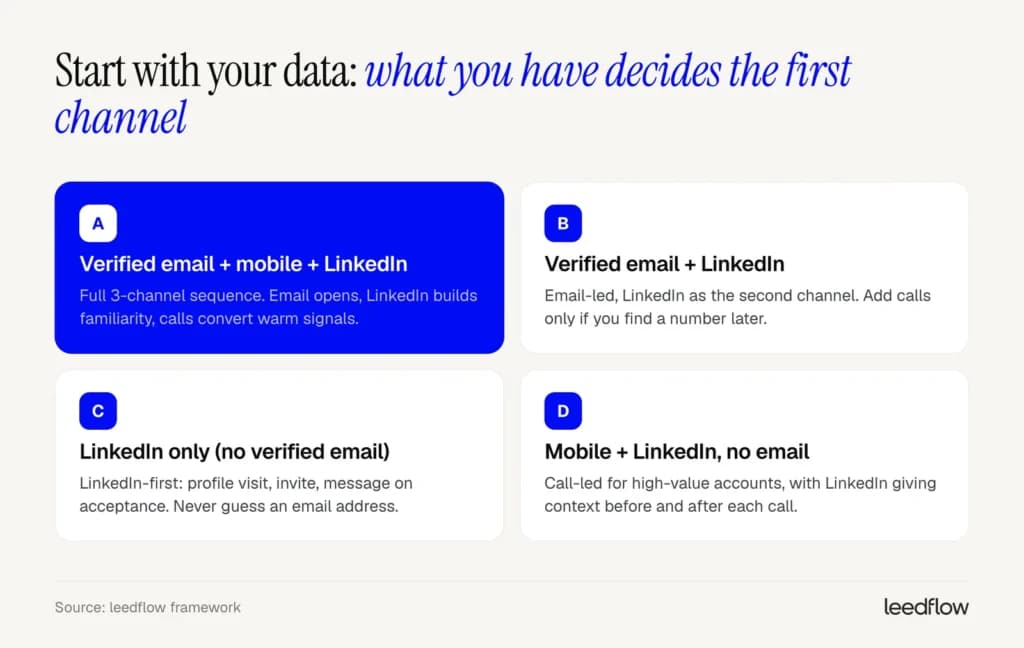
Most lists split into four profiles:
- Verified email + mobile + LinkedIn. Run the full three-channel sequence below.
- Verified email + LinkedIn. Email-led, with LinkedIn as the second channel. Add calls if you find a number later.
- LinkedIn only. LinkedIn-first. Don’t guess an email address: pattern-guessed emails bounce, and bounces hurt the domain your good emails depend on.
- Mobile + LinkedIn, no email. Call-led, which works for a short list of high-value accounts where a conversation is worth the effort.
So your data decides your sequence before you write a word.
With verified B2B contact data, you know which profile each prospect fits before the sequence starts. In leedflow, emails are verified in real time and the mobile phone finder is included on every plan, so the routing happens automatically instead of by hand.
How a branching multichannel sequence works
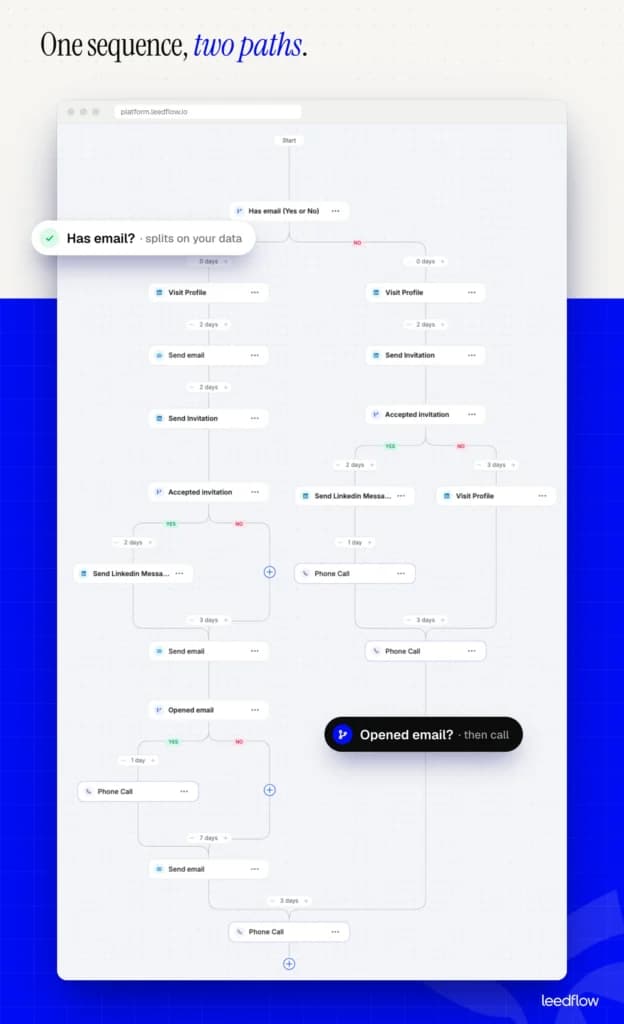
A branching sequence checks a condition, such as “has a verified email” or “accepted the invite”, and sends each prospect down a different path. One sequence can then serve every data profile and react to behaviour, so nobody gets a LinkedIn message they can’t receive or a call they haven’t earned.
Here’s a real example built in leedflow. It branches first on whether the prospect has an email, then on LinkedIn and email behaviour.
The “has email” path
- Day 0: visit the prospect’s LinkedIn profile. A light touch: they see your name before your email lands.
- Day 2: first email.
- Day 4: LinkedIn connection invitation.
- If the invitation is accepted: a LinkedIn message two days later that adds context rather than repeating the email.
- Three days later: second email.
- If that email was opened: a phone call the next day, while you’re still top of mind. If not, no call yet.
- After a 7-day pause: a third email with a new angle.
- Three days later: a final call to close the loop.
The LinkedIn-first path
With no verified email, the sequence starts with a profile visit, sends an invitation two days later, and then splits again. Accepted invitations get a LinkedIn message and a call the next day. If the invitation isn’t accepted, the prospect gets a second profile visit, which keeps you visible without pushing, before the final call.
Why conditions beat fixed timers
A fixed calendar treats every prospect the same: day 1 email, day 3 LinkedIn, day 5 call, whatever happened in between. Conditions let behaviour steer.
Expandi’s 2026 benchmarks recommend this kind of warm-up (profile view, engagement, then connect) because connection-note reply rates have been falling. It also protects your reputation. People who ignore you get fewer, calmer touches. People who engage get faster, more personal ones.
How many touches, and how far apart?
One email, then silence. That’s how a lot of outbound ends, and it throws away close to half the replies. The data points the same way across studies: 6–9 touches over 14–21 days, across all channels, with 2–3 business days between early touches and longer gaps later.
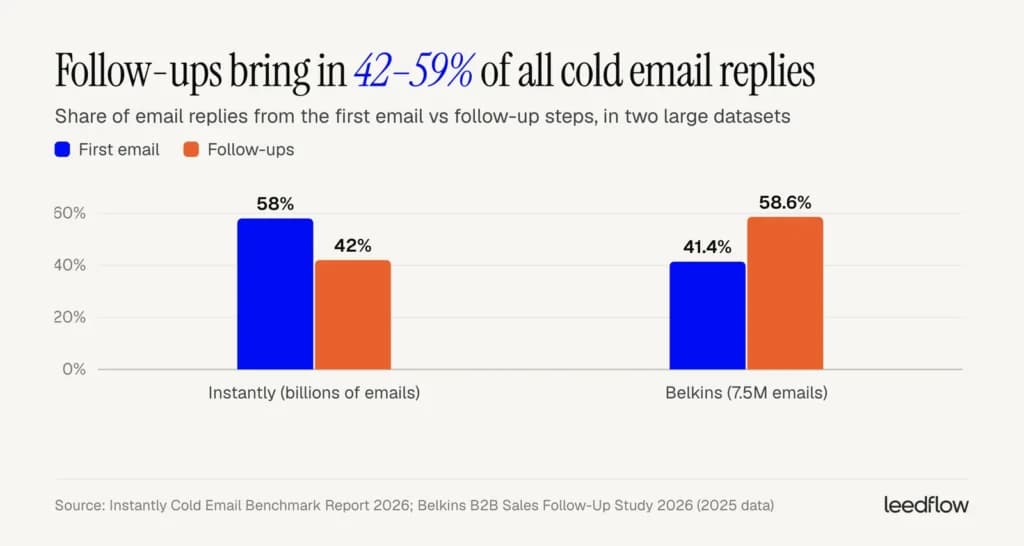
The two biggest datasets disagree on how much the first email matters, which is useful in itself. Instantly finds 58% of replies come from step one and recommends 4–7 touchpoints. Belkins finds the opposite split: steps 2–6 bring 58.6% of replies, and step 3 alone drives 35.6% of email-sourced meetings. Either way, follow-ups account for somewhere between 42% and 59% of replies.
The other failure is just as common. Most sequences are too long.
What we do:
- Every touch adds a new angle: observation → proof → a different problem → close the loop. “Just bumping this” doesn’t count.
- No more than two touches in a row on the same channel. Three touches in a row on the same channel starts to look like spam.
- Three to four touches per prospect per week, maximum, counting all channels together.
- Widen the gaps as you go: 2–3 days early on, 4–7 days near the end.
- Stop everywhere on any reply, including “not now”. Put “not now” replies in a nurture list and come back in about 90 days with something new.
3 multichannel sequences you can copy
Below are three sequences for the most common situations: a standard new-logo sequence, a fast lane for prospects with a fresh trigger, and a LinkedIn-first version for when you don’t have a verified email. Adjust the days to your sales cycle, but keep the logic: conditions before calls, and a new angle in every touch.
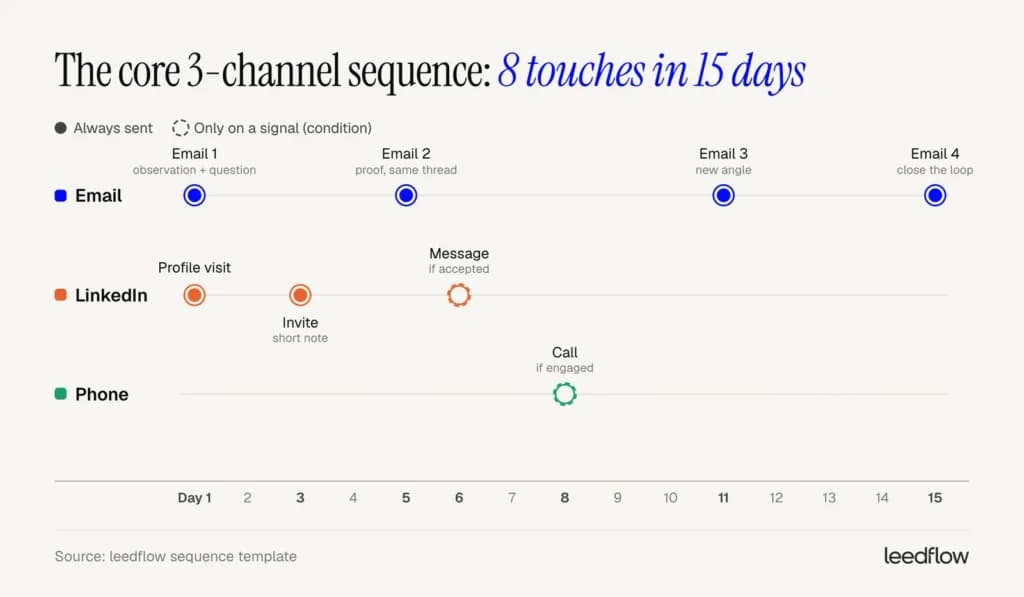
1. The core 3-channel sequence (15 days, 8 touches)
Use it for profile A and B prospects: a verified email plus LinkedIn, ideally with a mobile number.
| Day | Channel | Step | Angle |
|---|---|---|---|
| 1 | Profile visit | Light touch, no message | |
| 1 | Email 1 | A specific observation + one problem + a low-friction question | |
| 3 | Invite with a short note | Reference their role or company, no pitch | |
| 5 | Email 2 (same thread) | Proof: a result a similar company got | |
| 6 | Message (if accepted) | Add context or a useful resource | |
| 8 | Phone | Call (if they opened, clicked or accepted) | Reference the emails, ask one question |
| 11 | Email 3 | A different problem you solve | |
| 15 | Email 4 | Close the loop politely |
Keep the connection note short and relevant. In Belkins’ LinkedIn data, invites with a note were accepted slightly less often (25.3% vs 27.6%) but got far more replies (8.2% vs 5.3%). The note filters for people who actually care.
Email 1: observation + question
Subject: [Company]’s outbound in [country]
Hi [First name],
Noticed [Company] is hiring two SDRs in [city], usually a sign the team is scaling outbound to [market].
The part that tends to break first is the list: when emails keep going to people who’ve changed jobs, new SDRs spend their first month on cleanup instead of conversations.
How are you handling contact data for the new reps?
[Your name]
LinkedIn invite note (under 200 characters)
Hi [First name], I work with sales leaders scaling outbound in the Nordics. Saw [Company]’s growth in [market] and would like to follow along.
2. The trigger fast lane (7 days, 5–6 touches)
Use it when there’s a fresh reason to reach out now: a new Head of Sales, a funding round, a new market or a hiring push. Triggers lose value fast, so compress the timeline and bring the phone forward.
| Day | Channel | Step | Angle |
|---|---|---|---|
| 1 | Email + LinkedIn | Email 1 + profile visit | What usually changes after this trigger, and a question |
| 2 | Phone | Call | Short, specific: “you’ve just [trigger], is [problem] on your list?” |
| 3 | Invite with a note | Reference the trigger | |
| 5 | Email 2 | A resource that helps with the first 90 days after the trigger | |
| 7 | Phone or email | Final touch | Offer a short, concrete next step |
Don’t congratulate for the sake of it. “Congrats on the round!” is what everyone sends.
Say what tends to break after a funding round or a new leader instead, and ask whether it’s on their radar. A new Head of Sales usually inherits a pipeline target before they inherit a working process, so a question about the first 90 days lands better than praise.
3. The LinkedIn-first sequence (14 days, 5–6 touches)
Use it for profile C and D prospects: no verified email.
| Day | Channel | Step | Condition |
|---|---|---|---|
| 1 | Profile visit | Always | |
| 3 | Invite with a short note | Always | |
| 5 | Message | If accepted | |
| 6 | Phone | Call | If accepted and you have a mobile number |
| 6 | Second profile visit or a thoughtful comment on a recent post | If not accepted | |
| 9–14 | LinkedIn or phone | Final message or call | If there’s still no reply |
LinkedIn message after they accept
Thanks for connecting, [First name]. Quick one: when [Company] books meetings with [persona], is it mostly inbound, or is outbound a real channel for you yet? Asking because [one-line observation].
Common multichannel outreach mistakes
Someone replies “not interested” by email. The next day your tool sends them a LinkedIn message. That’s one of the most common mistakes in outbound, and it has nothing to do with copy.
Most multichannel mistakes happen when the channels don’t talk to each other:
- The same message everywhere. If your LinkedIn message is your email pasted into a chat, the prospect has now ignored you twice.
- Two reps, one prospect. Without duplicate prevention across the team, prospects get two sequences from the same company. leedflow blocks duplicates across team members and lets you blocklist existing customers, so nobody gets prospected twice.
- Calling without a signal. A cold call with no context has to do all the work. A call after two opens and an accepted invite starts halfway there.
- Guessed emails. Pattern-guessed addresses bounce. Keep bounces under 2%, the threshold Instantly recommends, or your domain’s reputation suffers for every campaign.
- Too many touches, too fast. Ten touches in ten days wears people out. Stay within 3–4 touches a week across channels.
Which metrics show your multichannel strategy is working?
Track each channel’s leading metric plus one outcome that covers the whole sequence: meetings booked per 100 prospects. Channel metrics tell you where the sequence leaks. Meetings per 100 tells you whether the system works.
| Metric | What it tells you | Benchmark |
|---|---|---|
| Email reply rate | Message and targeting fit | 3.43% average, 5.5%+ top quartile (Instantly) |
| LinkedIn acceptance rate | Targeting and profile credibility | 28.5% average (Expandi) |
| LinkedIn reply rate after connecting | Message quality | 10.4% average (Expandi) |
| Call connect rate | Phone data quality | 18.6% (Belkins) |
| Bounce rate | List quality | Under 2% |
| Spam complaint rate | Relevance and volume | Under 0.10%, never 0.30% (Google) |
| Meetings per 100 prospects | Whether the system works | Your own baseline. Compare sequences against each other |
Review the channel metrics weekly and the sequence design monthly.
When a number drops, change one thing at a time (the list, the first email, the order of channels) so you know what fixed it.
Build your first multichannel sequence in minutes
Leedflow gives you verified emails and mobile numbers for 400M+ contacts and runs email and LinkedIn sequences with conditional logic in one place, so every prospect gets the path their data supports.
A good multichannel outbound strategy sends each prospect the right next message, on the channel they’re most likely to answer. Start with your data, give every channel a job, let signals decide when to escalate, and compare plans on the leedflow pricing page when you’re ready to run it at scale.